Timeline
A composable event-history component for feeds, activity logs, and centered milestone timelines.
Usage
Rollout audit
Checkout redesign
Feature flag created
Owner assignedCreated checkout-redesign for the billing workspace.
Canary rollout started
CanaryEnabled for 5% of workspaces with session replay sampling on.
Regional guardrail tripped
PausedLatency climbed in eu-central-1; rollout is holding while routing warms.
Customer messaging prepared
DocsSupport macro and changelog draft are ready in Launch notes.
Launch window scheduled
QueuedFull rollout waits for the next error-budget sweep.
Release checklist verified
ReadyRollback owner and dashboard checks are recorded in the release audit.
"use client";

import { Timeline, type TimelineStatus } from "@thenamespace/uikit";
import { Chip } from "@thenamespace/uikit/chip";
import {Timeline is for read-only chronology: activity feeds, audit trails, incident history, release logs, and milestone roadmaps. Use Stepper when the user is moving through a known sequence where current, complete, and upcoming steps are the primary meaning.
Anatomy
Import the Timeline component and access all parts using dot notation.
import { Timeline } from "@thenamespace/uikit";

<Timeline>
  <Timeline.Item>
    <Timeline.Rail>
      <Timeline.Marker />
      <Timeline.Connector />
    </Timeline.Rail>
    <Timeline.Content>
      <article>
        <h3>Event title</h3>
        <time dateTime="2026-05-22">May 22, 2026</time>
        <p>Event details</p>
      </article>
    </Timeline.Content>
  </Timeline.Item>
</Timeline>;
Timeline intentionally owns only the chronology layout. It renders an ol with li items,
keeps connectors decorative, hides empty markers from assistive technology, and marks
status="current" items with aria-current="true". Use semantic HTML and OSS components such as
Card, Chip, and Avatar inside Timeline.Content for the event content itself.
Centered Milestones
- Research
Private beta
Invited design partners to stress-test billing, permissions, and reporting workflows.
24 teams - Billing
Usage-based pricing
Metered plans went live for sandbox workspaces after invoice previews cleared review.
3 plans - Expansion
Regional launch
Opened the EU data boundary with local support coverage and a launch brief.
2 regions - Marketplace
Partner network
First integrations shipped with shared certification notes and co-marketing assets.
8 partners - Governance
Enterprise controls
Audit logs, SSO handoff, and incident exports were bundled into the admin rollout.
5 controls - Adoption
Scale motion
Customer education, lifecycle emails, and release notes moved into one launch calendar.
12 touchpoints
- Research
Private beta
Invited design partners to stress-test billing, permissions, and reporting workflows.
24 teams - Billing
Usage-based pricing
Metered plans went live for sandbox workspaces after invoice previews cleared review.
3 plans - Expansion
Regional launch
Opened the EU data boundary with local support coverage and a launch brief.
2 regions - Marketplace
Partner network
First integrations shipped with shared certification notes and co-marketing assets.
8 partners - Governance
Enterprise controls
Audit logs, SSO handoff, and incident exports were bundled into the admin rollout.
5 controls - Adoption
Scale motion
Customer education, lifecycle emails, and release notes moved into one launch calendar.
12 touchpoints
"use client";

import {
  BadgeCheckIcon,
CheckmarkCircle02Icon,Studio Review
Studio review
Runner launch assets
- MS
Product asset uploaded
ReviewMina Sol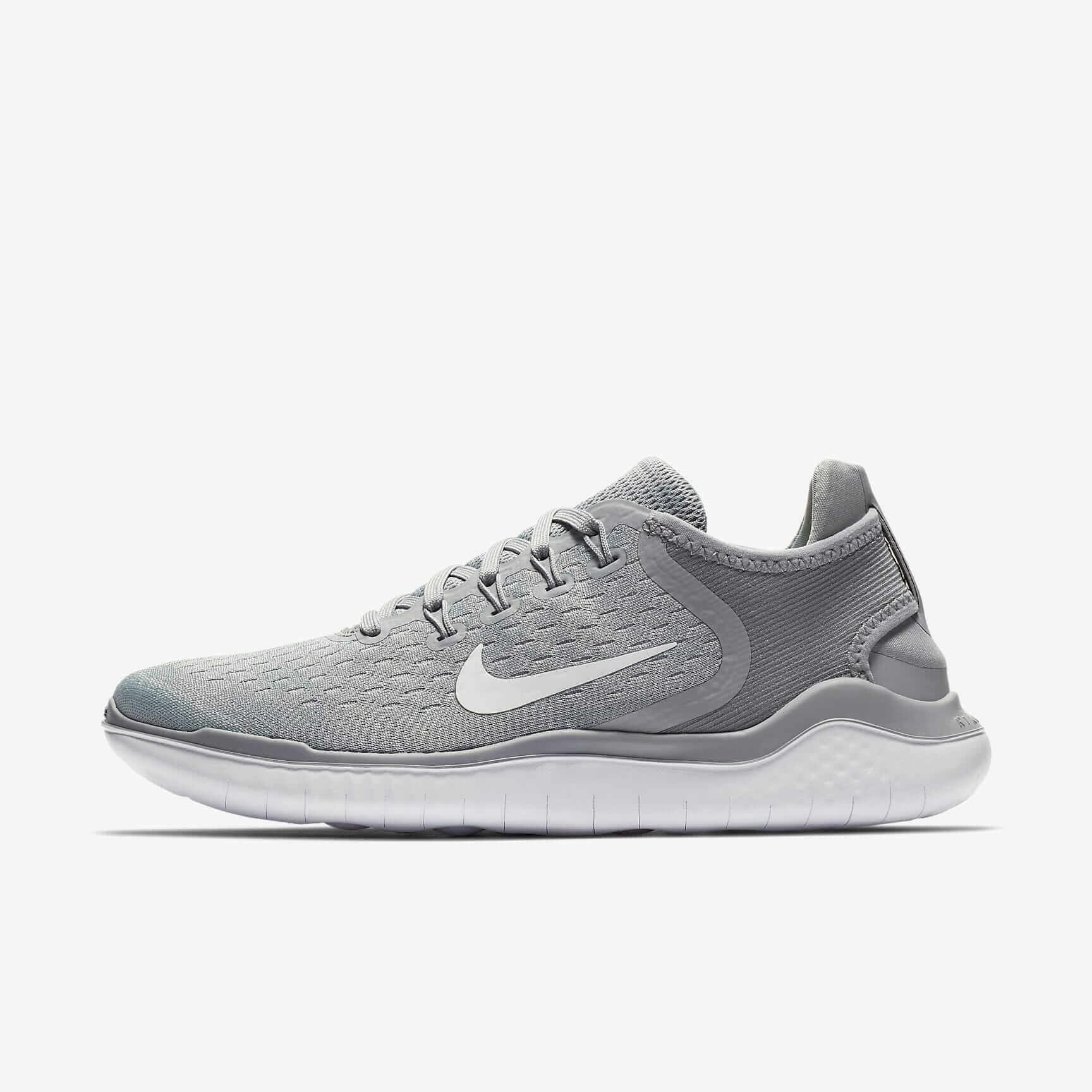
Final hero crop is ready for retouch review with the side profile, lace detail, and marketplace thumbnail queued.
- OV
Lighting pass reviewed
Orin ValeThe side profile reads clearly on the landing page. Keep the outsole shadow soft so the sole texture stays visible.
- PK
Copy note resolved
Paz KimUpdated the launch tile copy and aligned the product badge with the approved campaign language.
- MS
Review package ready
Mina SolExported the square crop, PDP detail view, and marketplace thumbnail for final QA.
"use client";

import {
  BadgeCheckIcon,
CheckmarkCircle02Icon,Compact Log
Chargeback case opened
The customer disputed a renewal charge, and the finance team has seven days to submit evidence.
Payment captured
Payment authorized
Invoice generated
"use client";

import { Timeline, type TimelineStatus } from "@thenamespace/uikit";
import {
CheckmarkCircle02Icon,Incident Response
Incident response
Export queue degradation
- Update fromNV
Nora Vazquez
On-callConfirmed the delay is isolated to scheduled exports. API requests and dashboard reads are healthy while the backlog drains.
worker-trace.har - 42 KBOpen runbook Escalation acknowledged by KRKaito Reed
Incident channel joined by MSMira Stone
Customer update sent to finance-ops
Mitigation deployed to export-worker-3
Postmortem reminder scheduled
"use client";

import {
  Attachment01Icon,
BadgeCheckIcon,Version History
Version history
v8
DraftPrepared billing copy, tax preview states, and the final approval checklist.
MMaya Chen-v7
LivePublished the pricing table refresh after support macros cleared review.
NNora Vazquez-v6
Added regional tax notes and restored the upgrade confirmation banner.
EEli Wong-v5
Reworked mobile spacing for plan cards and invoice preview rows.
MMaya Chen-v4
Imported partner terms and archived the legacy enterprise copy block.
NNora Vazquez-v3
Captured the first internal draft from the launch planning workspace.
EEli Wong-
"use client";

import { Timeline, type TimelineStatus } from "@thenamespace/uikit";
import { Avatar } from "@thenamespace/uikit/avatar";
import { Card } from "@thenamespace/uikit/card";Repository Activity
May 2026
Committed across 4 product workspaces
Rina Sol
lumenforge/interface126 commitsmistral-bench/checkout32 commitspixelwell/cli18 commitssignalnest/webhooks7 commitsMerged a pull request in lumenforge/interface
Theo Park
Tighten keyboard states in reporting grids
Reworked focus rings, empty states, and column resize handles for audit tables.
Opened 31 issues across 3 workspaces
Iris Moon
16 triaged9 assigned6 openReviewed 51 pull requests in 4 workspaces
Mara Voss
lumenforge/interface24 reviewsmistral-bench/checkout13 reviewspixelwell/cli9 reviewssignalnest/webhooks5 reviews
"use client";

import {
  AddCircleIcon,
EyeIcon,Split Content
Launch review
Billing rollout
- DesignNina Park
Checkout language approved
Invoice copy, empty states, and seat-change messages passed the annotation review.
Screens18Open notes2 - RiskOmar Lee
Upgrade holds confirmed
Fraud review added a manual hold rule for high-value upgrades during the first rollout window.
Threshold$750Review SLA4 h - DataMaya Hart
Metrics dashboard connected
Billing telemetry is flowing into the release dashboard with workspace and plan dimensions.
Events12Lag42 s - OpsPriya Shah
Customer messaging staged
Support macros, changelog copy, and escalation routing are scheduled for the release window.
Macros6Regions3 - LaunchEli Wong
Release checklist signed
The rollback owner, dashboard links, and launch channel are pinned for the final go-live check.
Checks9/9Window15 min
"use client";

import {
  BadgeCheckIcon,
CheckmarkCircle02Icon,API Reference
Timeline
The root component. Renders an ordered list and provides axis, placement, size, density, and item alignment context.
| Prop | Type | Default | Description |
|---|---|---|---|
axis | 'start' | 'center' | 'start' | Position of the timeline rail |
placement | 'start' | 'end' | 'alternate' | 'end' | Default side for item content; alternate alternates by item index |
size | 'sm' | 'md' | 'lg' | 'md' | Marker and text size |
density | 'compact' | 'comfortable' | 'comfortable' | Vertical rhythm between events |
itemAlign | 'start' | 'center' | 'start' | Default vertical alignment for item content |
children | ReactNode | - | Timeline items |
Also supports all native ol HTML attributes.
Timeline.Item
A single event in the timeline.
| Prop | Type | Default | Description |
|---|---|---|---|
status | 'default' | 'current' | 'success' | 'warning' | 'danger' | 'muted' | 'default' | Marker tone |
align | 'start' | 'center' | inherited | Vertical alignment for item content |
side | 'start' | 'end' | inherited | Content side for centered timelines |
children | ReactNode | - | Item parts |
Also supports all native li HTML attributes.
Timeline.Rail
Rail wrapper for the marker and connector. If omitted, Timeline.Item renders a default rail.
| Prop | Type | Default | Description |
|---|---|---|---|
children | ReactNode | - | Marker and connector content |
Also supports all native span HTML attributes.
Timeline.Marker
The event marker. If omitted, Timeline.Rail renders a default marker. Empty markers are
decorative and hidden from assistive technology.
| Prop | Type | Default | Description |
|---|---|---|---|
status | 'default' | 'current' | 'success' | 'warning' | 'danger' | 'muted' | item status | Marker tone override |
children | ReactNode | - | Custom marker content |
Also supports all native span HTML attributes.
Timeline.Connector
Connector line after the current item. It is hidden automatically for the last item.
| Prop | Type | Default | Description |
|---|---|---|---|
force | boolean | false | Force rendering even on the last item |
Also supports all native span HTML attributes.
Timeline.Content
Main event content. In centered timelines, side controls which side of the axis it occupies.
| Prop | Type | Default | Description |
|---|---|---|---|
side | 'start' | 'end' | item side | Content side |
children | ReactNode | - | Content parts |
Also supports all native div HTML attributes.
useTimelineItem
Hook to access per-item context from descendants of Timeline.Item.
| Property | Type | Description |
|---|---|---|
align | 'start' | 'center' | Resolved item content alignment |
index | number | Zero-based item index |
isLast | boolean | Whether this is the final timeline item |
side | 'start' | 'end' | Resolved item side |
status | 'default' | 'current' | 'success' | 'warning' | 'danger' | 'muted' | Item marker status |